Using Flink
CDC Ingestion
CDC (change data capture) keeps track of data changes evolving in a source system so a downstream process or system can act on those changes. We recommend two ways for syncing CDC data into Hudi:
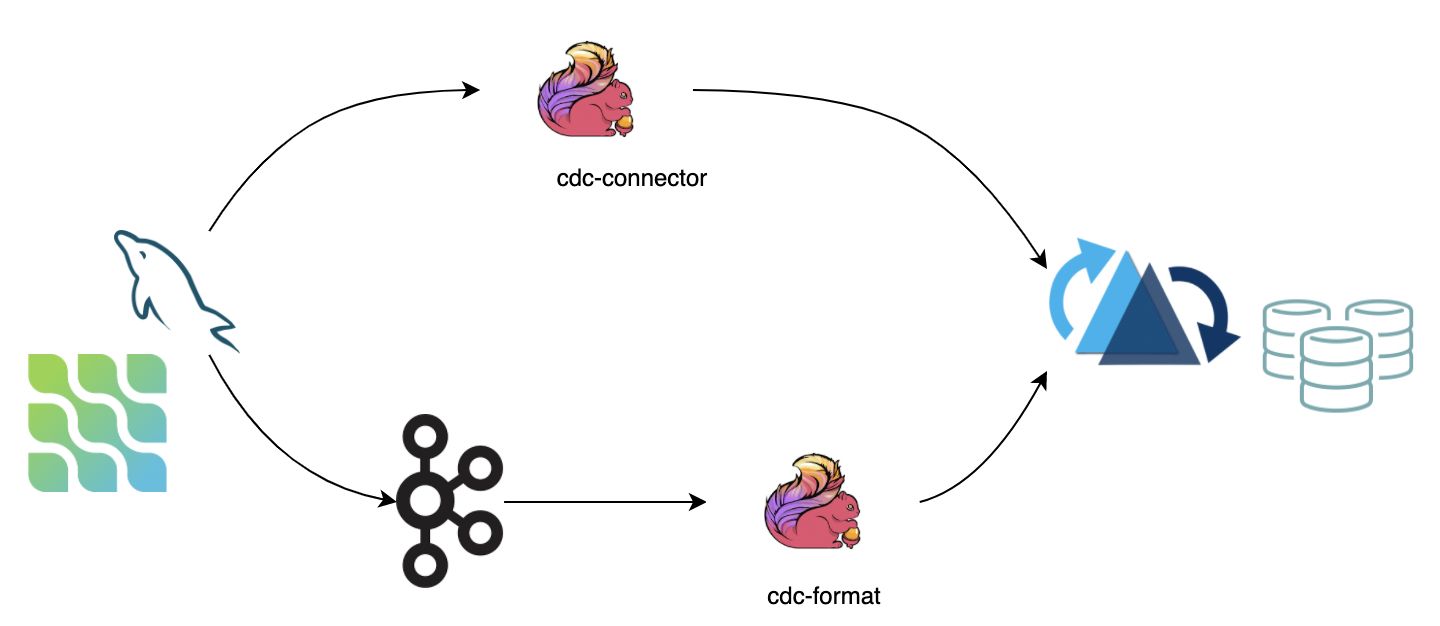
- Use Apache Flink-CDC to directly connect to the database server and sync binlog data into Hudi. The advantage is that it does not rely on message queues, but the disadvantage is that it puts pressure on the database server.
- Consume data from a message queue (e.g., Kafka) using the Flink CDC format. The advantage is that it is highly scalable, but the disadvantage is that it relies on message queues.
If the upstream data cannot guarantee ordering, you need to explicitly specify the ordering.fields option.
Bulk Insert
For snapshot data import requirements, if the snapshot data comes from other data sources, use the bulk_insert mode to quickly
import the snapshot data into Hudi.
bulk_insert eliminates serialization and data merging. Data deduplication is skipped, so the user needs to guarantee data uniqueness.
bulk_insert is more efficient in batch execution mode. By default, batch execution mode sorts the input records
by partition path and writes these records to Hudi, which can avoid write‑performance degradation caused by
frequent file‑handle switching.
The parallelism of bulk_insert is specified by write.tasks. The parallelism affects the number of small files.
In theory, the parallelism of bulk_insert equals the number of buckets. (In particular, when each bucket writes to the maximum file size, it
rolls over to a new file handle.) The final number of files is greater than or equal to write.bucket_assign.tasks.
Options
| Option Name | Required | Default | Remarks |
|---|---|---|---|
write.operation | true | upsert | Set to bulk_insert to enable this function |
write.tasks | false | 4 | The parallelism of bulk_insert; the number of files ≥ write.bucket_assign.tasks |
write.bulk_insert.shuffle_input | false | true | Whether to shuffle data by the input field before writing. Enabling this option reduces the number of small files but may introduce data‑skew risk |
write.bulk_insert.sort_input | false | true | Whether to sort data by the input field before writing. Enabling this option reduces the number of small files when a write task writes to multiple partitions |
write.sort.memory | false | 128 | Available managed memory for the sort operator; default is 128 MB |
Index Bootstrap
For importing both snapshot data and incremental data: if the snapshot data has already been inserted into Hudi via bulk insert, users can insert incremental data in real time and ensure the data is not duplicated by using the index bootstrap function.
If you find this process very time‑consuming, you can add resources to write in streaming mode while writing snapshot data, then reduce the resources when writing incremental data (or enable the rate‑limit function).
Options
| Option Name | Required | Default | Remarks |
|---|---|---|---|
index.bootstrap.enabled | true | false | When index bootstrap is enabled, the remaining records in the Hudi table are loaded into the Flink state at once |
index.partition.regex | false | * | Optimization option. Set a regular expression to filter partitions. By default, all partitions are loaded into Flink state |
How to use
- Use
CREATE TABLEto create a statement corresponding to the Hudi table. Note thattable.typemust be correct. - Set
index.bootstrap.enabled=trueto enable the index bootstrap function. - Set the Flink checkpoint failure tolerance in
flink-conf.yaml:execution.checkpointing.tolerable-failed-checkpoints = n(depending on Flink checkpoint scheduling times). - Wait until the first checkpoint succeeds, indicating that the index bootstrap has completed.
- After the index bootstrap completes, users can exit and save the savepoint (or directly use the externalized checkpoint).
- Restart the job, setting
index.bootstrap.enabletofalse.
- Index bootstrap is blocking, so checkpoints cannot complete during index bootstrap.
- Index bootstrap is triggered by the input data. Users need to ensure that there is at least one record in each partition.
- Index bootstrap executes concurrently. Users can search logs for
finish loading the index under partitionandLoad record from fileto observe the index‑bootstrap progress. - The first successful checkpoint indicates that the index bootstrap has completed. There is no need to load the index again when recovering from the checkpoint.
Changelog Mode
Hudi can keep all the intermediate changes (I / -U / U / D) of messages, then consume them through stateful computing in Flink to build a near‑real‑time data‑warehouse ETL pipeline (incremental computing). Hudi MOR tables store messages as rows, which supports the retention of all change logs (integration at the format level). All changelog records can be consumed with the Flink streaming reader.
Options
| Option Name | Required | Default | Remarks |
|---|---|---|---|
changelog.enabled | false | false | It is turned off by default, to have the upsert semantics, only the merged messages are ensured to be kept, intermediate changes may be merged. Setting to true to support consumption of all changes |
Batch (snapshot) reads still merge all the intermediate changes, regardless of whether the format has stored the intermediate changelog messages.
After setting changelog.enable to true, the retention of changelog records is best‑effort only: the asynchronous compaction task will merge the changelog records into one record, so if the
stream source does not consume in a timely manner, only the merged record for each key can be read after compaction. The solution is to reserve buffer time for the reader by adjusting the compaction strategy, such as
the compaction options compaction.delta_commits and compaction.delta_seconds.
Append Mode
For INSERT mode write operations, new Parquet files are written directly, and the auto‑file sizing is not enabled.
Append Write Buffer
For append-only workloads, Hudi supports several write-buffer strategies that improve Parquet compression ratio and write throughput. Data is sorted or batched within the write buffer before being flushed to disk, grouping similar values together for better columnar compression.
The buffer strategy is selected with write.buffer.type. In Hudi 1.2.0 this replaces the deprecated write.buffer.sort.enabled flag.
| Option Name | Required | Default | Remarks |
|---|---|---|---|
write.buffer.type | false | NONE | Buffer type for append write. Values: NONE (no buffering), BOUNDED_IN_MEMORY (double buffer with async write), DISRUPTOR (ring-buffer with async write, recommended for higher throughput), CONTINUOUS_SORT (TreeMap-based continuous sort with incremental draining) |
write.buffer.size | false | 1000 | Record count threshold at which the buffer is flushed. Applies to all non-NONE buffer types |
write.buffer.sort.keys | false | N/A | Comma-separated sort key columns (e.g., col1,col2). Required for DISRUPTOR and CONTINUOUS_SORT modes |
write.buffer.sort.continuous.drain.size | false | 1 | Number of records drained per flush cycle in CONTINUOUS_SORT mode. Default 1 provides smooth incremental draining; increase for batching (e.g., 10–100) |
write.buffer.sort.enabled is deprecated as of 1.2.0. Use write.buffer.type=DISRUPTOR instead for equivalent behavior. The DISRUPTOR and CONTINUOUS_SORT modes require write.buffer.sort.keys to be set.
For Disruptor-specific tuning options, see flink_tuning.md.
Disable Meta Fields
For append-only workloads where Hudi metadata fields (e.g., _hoodie_commit_time, _hoodie_record_key) are not needed, you can disable them to reduce storage overhead. This is useful when integrating with external systems that don't require Hudi-specific metadata.
| Option Name | Required | Default | Remarks |
|---|---|---|---|
hoodie.populate.meta.fields | false | true | Whether to populate Hudi meta fields. Set to false for append-only workloads to reduce storage overhead. Note: Some Hudi features may not work when disabled |
Hudi supports rich clustering strategies to optimize the files layout for INSERT mode:
Inline Clustering
Only Copy‑on‑Write tables are supported.
| Option Name | Required | Default | Remarks |
|---|---|---|---|
write.insert.cluster | false | false | Whether to merge small files while ingesting. For COW tables, enable this option to use the small‑file merging strategy (no deduplication for keys, but throughput will be affected) |
Async Clustering
| Option Name | Required | Default | Remarks |
|---|---|---|---|
clustering.schedule.enabled | false | false | Whether to schedule the clustering plan during the write process; default is false |
clustering.delta_commits | false | 4 | Delta commits for scheduling the clustering plan; only valid when clustering.schedule.enabled is true |
clustering.async.enabled | false | false | Whether to execute the clustering plan asynchronously; default is false |
clustering.tasks | false | 4 | Parallelism of the clustering tasks |
clustering.plan.strategy.target.file.max.bytes | false | 1024*1024*1024 | The target file size for the clustering group; default is 1 GB |
clustering.plan.strategy.small.file.limit | false | 600 | Files smaller than the threshold (in MB) are candidates for clustering |
clustering.plan.strategy.sort.columns | false | N/A | The columns to sort by when clustering |
Clustering Plan Strategy
Custom clustering strategy is supported. Hudi 1.2.0 adds FlinkSkipSingleFileClusteringPlanStrategy (org.apache.hudi.client.clustering.plan.strategy.FlinkSkipSingleFileClusteringPlanStrategy), which skips file groups that already consist of a single file, reducing unnecessary rewrites.
| Option Name | Required | Default | Remarks |
|---|---|---|---|
clustering.plan.partition.filter.mode | false | NONE | Valid options 1) NONE: no limit; 2) RECENT_DAYS: choose partitions that represent recent days; 3) SELECTED_PARTITIONS: specific partitions |
clustering.plan.strategy.daybased.lookback.partitions | false | 2 | Number of partitions to look back; valid for RECENT_DAYS mode |
clustering.plan.strategy.cluster.begin.partition | false | N/A | Valid for SELECTED_PARTITIONS mode; specify the partition to begin with (inclusive) |
clustering.plan.strategy.cluster.end.partition | false | N/A | Valid for SELECTED_PARTITIONS mode; specify the partition to end with (inclusive) |
clustering.plan.strategy.partition.regex.pattern | false | N/A | The regex to filter the partitions |
clustering.plan.strategy.partition.selected | false | N/A | Specific partitions, separated by commas |
Using Bucket Index
Hudi Flink writer supports two types of writer indexes:
- Flink state (default)
- Bucket index (3 variants: simple, partition-level, consistent hashing)
Comparison
| Feature | Bucket Index | Flink State Index |
|---|---|---|
| How It Works | Uses a deterministic hash algorithm to shuffle records into buckets | Uses the Flink state backend to store index data: mappings of record keys to their residing file group's file IDs |
| Computing/Storage Cost | No cost for state‑backend indexing | Has computing and storage cost for maintaining state; can become a bottleneck when working with large Hudi tables |
| Performance | Better performance due to no state overhead | Performance depends on state backend efficiency |
| File Group Flexibility | Simple: Fixed number of buckets (file groups) per partition, immutable once set Partition-Level: Different fixed buckets per partition via regex patterns (rescaling requires Spark procedure) Consistent Hashing: Auto-resizing buckets via clustering | Dynamically assigns records to file groups based on current table layout; no pre-configured limits on file group count |
| Cross‑Partition Changes | Cannot handle changes among partitions (unless input is a CDC stream) | No limit on handling cross‑partition changes |
Bucket index supports UPSERT write operations on both COW and MOR tables. As of Hudi 1.2.0, MOR + bucket index + upsert is fully supported. Bucket index cannot be used with the append mode in Flink.
Bucket Index Examples
Simple Bucket Index
Fixed number of buckets across all partitions:
CREATE TABLE orders_simple_bucket (
  order_id BIGINT,
  customer_id BIGINT,
  amount DOUBLE,
  order_date STRING,
  ts BIGINT,
  PRIMARY KEY (order_id) NOT ENFORCED
) PARTITIONED BY (order_date)
WITH (
  'connector' = 'hudi',
  'path' = 'hdfs:///warehouse/orders_simple',
  'table.type' = 'MERGE_ON_READ',

  -- Bucket Index Configuration
  'index.type' = 'BUCKET',
  'hoodie.bucket.index.engine' = 'SIMPLE',
  'hoodie.bucket.index.hash.field' = 'order_id',
  'hoodie.bucket.index.num.buckets' = '16'  -- Fixed 16 buckets for ALL partitions
);

-- Insert data
INSERT INTO orders_simple_bucket VALUES
  (1, 100, 99.99, '2024-01-15', 1000),
  (2, 101, 49.99, '2024-02-20', 2000);
Partition-Level Bucket Index
Different bucket counts for different partitions based on regex patterns:
CREATE TABLE orders_partition_bucket (
  order_id BIGINT,
  customer_id BIGINT,
  amount DOUBLE,
  order_date STRING,
  ts BIGINT,
  PRIMARY KEY (order_id) NOT ENFORCED
) PARTITIONED BY (order_date)
WITH (
  'connector' = 'hudi',
  'path' = 'hdfs:///warehouse/orders_partition',
  'table.type' = 'MERGE_ON_READ',

  -- Bucket Index Configuration
  'index.type' = 'BUCKET',
  'hoodie.bucket.index.engine' = 'SIMPLE',
  'hoodie.bucket.index.hash.field' = 'order_id',

  -- Partition-Level Configuration
  'hoodie.bucket.index.num.buckets' = '8',  -- Default for non-matching partitions
  'hoodie.bucket.index.partition.rule.type' = 'regex',
  -- Black Friday (11-24), Cyber Monday (11-27), Christmas (12-25) get 128 buckets
  -- All other dates get 8 buckets (default)
  'hoodie.bucket.index.partition.expressions' = '\\d{4}-(11-(24|27)|12-25),128'
);

-- Insert data - bucket count varies by partition
INSERT INTO orders_partition_bucket VALUES
  (1, 100, 999.99, '2024-11-24', 1000),  -- Black Friday: 128 buckets
  (2, 101, 499.99, '2024-11-27', 2000),  -- Cyber Monday: 128 buckets
  (3, 102, 299.99, '2024-12-25', 3000),  -- Christmas: 128 buckets
  (4, 103, 49.99, '2024-01-15', 4000);   -- Regular day: 8 buckets
For existing simple bucket index tables, use the Spark partition_bucket_index_manager procedure to upgrade to partition-level bucket index. After upgrade, Flink writers automatically load the expressions from table metadata.
Consistent Hashing Bucket Index
Auto-expanding buckets via clustering (requires Spark for execution):
CREATE TABLE orders_consistent_hashing (
  order_id BIGINT,
  customer_id BIGINT,
  amount DOUBLE,
  order_date STRING,
  ts BIGINT,
  PRIMARY KEY (order_id) NOT ENFORCED
) PARTITIONED BY (order_date)
WITH (
  'connector' = 'hudi',
  'path' = 'hdfs:///warehouse/orders_consistent',
  'table.type' = 'MERGE_ON_READ',

  -- Consistent Hashing Bucket Index
  'index.type' = 'BUCKET',
  'hoodie.bucket.index.engine' = 'CONSISTENT_HASHING',
  'hoodie.bucket.index.hash.field' = 'order_id',

  -- Initial and boundary configuration
  'hoodie.bucket.index.num.buckets' = '4',      -- Initial bucket count
  'hoodie.bucket.index.min.num.buckets' = '2',  -- Minimum allowed
  'hoodie.bucket.index.max.num.buckets' = '128', -- Maximum allowed

  -- Clustering configuration (required for auto-resizing)
  'clustering.schedule.enabled' = 'true',
  'clustering.delta_commits' = '5',  -- Schedule clustering every 5 commits
  'clustering.plan.strategy.class' = 'org.apache.hudi.client.clustering.plan.strategy.FlinkConsistentBucketClusteringPlanStrategy',

  -- File size thresholds for bucket resizing
  'hoodie.clustering.plan.strategy.target.file.max.bytes' = '1073741824',  -- 1GB max
  'hoodie.clustering.plan.strategy.small.file.limit' = '314572800'  -- 300MB min
);

-- Insert data - buckets auto-adjust based on file sizes
INSERT INTO orders_consistent_hashing
SELECT * FROM source_stream;
Consistent hashing bucket index automatically adjusts bucket counts via clustering. Flink can schedule clustering plans, but execution currently requires Spark. Start with hoodie.bucket.index.num.buckets and the system dynamically resizes based on file sizes within the min/max bounds.
Configuration Reference
| Option | Applies To | Default | Description |
|---|---|---|---|
index.type | All | FLINK_STATE | Set to BUCKET to enable bucket index |
hoodie.bucket.index.engine | All | SIMPLE | Engine type: SIMPLE or CONSISTENT_HASHING |
hoodie.bucket.index.hash.field | All | Record key | Fields to hash for bucketing; can be a subset of record key |
hoodie.bucket.index.num.buckets | All | 4 | Default bucket count per partition (initial count for consistent hashing) |
hoodie.bucket.index.partition.expressions | Partition-Level | N/A | Regex patterns and bucket counts: pattern1,count1;pattern2,count2 |
hoodie.bucket.index.partition.rule.type | Partition-Level | regex | Rule parser type |
hoodie.bucket.index.min.num.buckets | Consistent Hashing | N/A | Minimum bucket count (prevents over-merging) |
hoodie.bucket.index.max.num.buckets | Consistent Hashing | N/A | Maximum bucket count (prevents unlimited expansion) |
clustering.schedule.enabled | Consistent Hashing | false | Must be true for auto-resizing |
clustering.plan.strategy.class | Consistent Hashing | N/A | Set to FlinkConsistentBucketClusteringPlanStrategy |
Rate Limiting
Hudi provides rate limiting capabilities for both writes and streaming reads to control data flow and prevent performance degradation.
Write Rate Limiting
In many scenarios, users publish both historical snapshot data and real‑time incremental updates to the same message queue, then consume from the earliest offset using Flink to ingest everything into Hudi. This backfill pattern can cause performance issues:
- High burst throughput: The entire historical dataset arrives at once, overwhelming the writer with a massive volume of records
- Scattered writes across table partitions: Historical records arrive scattered across many different table partitions (e.g., records from many different dates if the table is partitioned by date). This forces the writer to constantly switch between partitions, keeping many file handles open simultaneously and causing memory pressure, which degrades write performance and causes throughput instability
The write.rate.limit option helps smooth out the ingestion flow, preventing traffic jitter and improving stability during backfill operations.
Streaming Read Rate Limiting
For Flink streaming reads, rate limiting helps avoid backpressure when processing large workloads. The read.splits.limit option controls the maximum number of input splits allowed to be read in each check interval. This feature is particularly useful when:
- Reading from tables with a large backlog of commits
- Preventing downstream operators from being overwhelmed
- Controlling resource consumption during catch-up scenarios
The average read rate can be calculated as: read.splits.limit / read.streaming.check-interval splits per second.
Hudi 1.2.0 adds read.commits.limit, which complements read.splits.limit by capping the number of commits (instants) consumed per check interval. This is useful when tables have many small commits — limiting commits bounds the number of splits regardless of their individual size.
Options
| Option Name | Required | Default | Remarks |
|---|---|---|---|
write.rate.limit | false | 0 | Write record rate limit per second to prevent traffic jitter and improve stability. Default is 0 (no limit) |
read.splits.limit | false | Integer.MAX_VALUE | Maximum number of splits allowed to read in each instant check for streaming reads. Average read rate = read.splits.limit/read.streaming.check-interval. Default is no limit |
read.commits.limit | false | (none) | Maximum number of commits (instants) allowed to read in each check interval. Complements read.splits.limit. Average rate = read.commits.limit/read.streaming.check-interval. Default is no limit |
read.streaming.check-interval | false | 60 | Check interval in seconds for streaming reads. Default is 60 seconds (1 minute) |
Flink Source V2
Hudi 1.2.0 introduces a new Flink source implementation (RFC-95) based on FLIP-27, available as an opt-in feature via the read.source-v2.enabled flag.
Why Source V2?
The legacy Hudi Flink source was built on Flink's SourceFunction API. The FLIP-27 rewrite brings:
- Resumable split assignment — splits can be checkpointed independently, enabling finer-grained recovery
- Checkpoint alignment — the new API participates in Flink's coordinated checkpoint protocol, improving end-to-end consistency
- Push-down support — predicate push-down, partition pruning, and
LIMITpush-down are supported through the new source interface, reducing data scanned at the source level
Enabling Source V2
CREATE TABLE t1 (
  uuid VARCHAR(20) PRIMARY KEY NOT ENFORCED,
  name VARCHAR(10),
  age INT,
  ts TIMESTAMP(3),
  `partition` VARCHAR(20)
)
PARTITIONED BY (`partition`)
WITH (
  'connector' = 'hudi',
  'path' = '${path}',
  'table.type' = 'MERGE_ON_READ',
  'read.source-v2.enabled' = 'true'  -- enable the FLIP-27 source
);
Options
| Option Name | Required | Default | Remarks |
|---|---|---|---|
read.source-v2.enabled | false | false | Whether to use the FLIP-27 new source (Source V2) to consume data files. Default is the legacy source |
Savepoint Incompatibility
Savepoints taken with the legacy source (read.source-v2.enabled=false) are not compatible with the Source V2 source, and vice versa. When switching from the legacy source to Source V2, start a fresh job without restoring from a legacy savepoint. If you need to preserve read progress, record the last committed instant time and use read.start-commit to resume from that point.
Record-Level Index (RLI) Bucket Indexing for Flink
As of Hudi 1.2.0, the Flink writer supports the Record-Level Index (RLI) backed by the metadata table, in addition to the existing FLINK_STATE and BUCKET index types. RLI is stored in the metadata table and avoids the state-backend overhead of FLINK_STATE, while supporting full global or partition-scoped uniqueness guarantees.
Two RLI variants are available via index.type:
RECORD_LEVEL_INDEX— partitioned RLI; enforces uniqueness per (partition path, record key) pairGLOBAL_RECORD_LEVEL_INDEX— global RLI; enforces uniqueness across all partitions
Bootstrap
When enabling RLI on an existing table, the bootstrap process loads existing record locations into RocksDB before the first write. Bootstrap is triggered by setting index.bootstrap.enabled=true.
CREATE TABLE my_hudi_table (
  id BIGINT,
  name STRING,
  ts BIGINT,
  dt STRING,
  PRIMARY KEY (id) NOT ENFORCED
)
PARTITIONED BY (dt)
WITH (
  'connector' = 'hudi',
  'path' = 'hdfs:///warehouse/my_hudi_table',
  'table.type' = 'MERGE_ON_READ',
  'index.type' = 'RECORD_LEVEL_INDEX',
  'metadata.enabled' = 'true',
  'index.bootstrap.enabled' = 'true',  -- enable bootstrap on first run
  'index.bootstrap.rocksdb.path' = '/tmp/hudi-rli-rocksdb'
);
Once bootstrap completes (after the first successful checkpoint), you can optionally restart the job with index.bootstrap.enabled=false to skip the bootstrap operators. Leaving them enabled is harmless — they become no-ops on subsequent runs and do not affect write performance.
In-Pipeline MDT Compaction
For RLI workloads, the metadata table (MDT) accumulates log files that need periodic compaction. The option metadata.compaction.async.enabled (default true) runs MDT compaction inside the Flink pipeline after every metadata.compaction.delta_commits (default 10) delta commits.
Options
| Option Name | Required | Default | Remarks |
|---|---|---|---|
index.type | false | FLINK_STATE | Set to RECORD_LEVEL_INDEX or GLOBAL_RECORD_LEVEL_INDEX to use the metadata-table-backed RLI |
index.bootstrap.enabled | false | false | Bootstrap the index from the existing table on first run. Blocks checkpoints during bootstrap |
index.bootstrap.rocksdb.path | false | system temp dir | Local path for RocksDB storage during RLI bootstrap. Each task manager creates a unique subdirectory under this path |
index.rli.cache.size | false | 256 | Maximum memory in MB for the RLI cache per bucket-assign task. Dynamically adjusted based on historical usage |
index.rli.lookup.minibatch.size | false | 1000 | Maximum records buffered per mini-batch during RLI lookup. Mini-batching reduces individual index lookups. Minimum effective value is 1000 |
metadata.compaction.async.enabled | false | true | Whether to run MDT compaction asynchronously within the Flink pipeline. Recommended to keep enabled for RLI workloads |
metadata.compaction.delta_commits | false | 10 | Number of MDT delta commits that trigger in-pipeline compaction |
GLOBAL_RECORD_LEVEL_INDEX requires metadata.enabled=true and index.global.enabled=true. The Flink table factory validates these constraints automatically.
Lookup Join
Hudi 1.2.0 adds a RocksDB-backed cache option for Flink lookup joins against Hudi dimension tables. This avoids JVM heap pressure when the dimension table is large.
Options
| Option Name | Required | Default | Remarks |
|---|---|---|---|
lookup.join.cache.type | false | heap | Storage backend for the lookup join cache. heap (default) stores rows in JVM heap; rocksdb stores rows off-heap in an embedded RocksDB instance |
lookup.join.rocksdb.path | false | ${java.io.tmpdir}/hudi-lookup-rocksdb | Local directory for RocksDB data when lookup.join.cache.type=rocksdb. Cleaned up when the lookup function closes |
lookup.async | false | false | Whether to enable async lookup join. Async join can improve throughput when the lookup function has high latency |
lookup.async-thread-number | false | 16 | Number of threads for async lookup join |
Example
-- Streaming fact table with a processing-time attribute
CREATE TABLE orders (
  order_id BIGINT,
  customer_id BIGINT,
  amount DOUBLE,
  proc_time AS PROCTIME(),
  PRIMARY KEY (order_id) NOT ENFORCED
) WITH (
  'connector' = 'hudi',
  'path' = 'hdfs:///warehouse/orders',
  'table.type' = 'MERGE_ON_READ',
  'read.streaming.enabled' = 'true'
);

-- Hudi dimension table with RocksDB-backed lookup cache
CREATE TABLE customers (
  customer_id BIGINT,
  name STRING,
  city STRING,
  PRIMARY KEY (customer_id) NOT ENFORCED
) WITH (
  'connector' = 'hudi',
  'path' = 'hdfs:///warehouse/customers',
  'lookup.join.cache.type' = 'rocksdb',
  'lookup.join.rocksdb.path' = '/tmp/hudi-lookup-rocksdb'
);

-- Lookup join keyed by the fact table's processing-time attribute
SELECT o.order_id, c.name, o.amount
FROM orders AS o
JOIN customers FOR SYSTEM_TIME AS OF o.proc_time AS c
  ON o.customer_id = c.customer_id;
Virtual Metadata Columns
Hudi metadata fields can be declared as METADATA VIRTUAL columns in the Flink DDL. This allows accessing system metadata (e.g., commit time, record key) without storing them as regular data columns.
CREATE TABLE events (
  event_id BIGINT,
  payload STRING,
  -- virtual metadata columns (read-only, not persisted as data)
  _hoodie_commit_time     STRING METADATA VIRTUAL,
  _hoodie_record_key      STRING METADATA VIRTUAL,
  _hoodie_partition_path  STRING METADATA VIRTUAL,
  PRIMARY KEY (event_id) NOT ENFORCED
)
WITH (
  'connector' = 'hudi',
  'path' = 'hdfs:///warehouse/events'
);

-- Query metadata alongside data
SELECT event_id, _hoodie_commit_time, payload FROM events;
Only VIRTUAL metadata columns are supported. All valid virtual columns correspond to Hudi's built-in meta fields (_hoodie_commit_time, _hoodie_commit_seqno, _hoodie_record_key, _hoodie_partition_path, _hoodie_file_name, _hoodie_operation).
Engine constraints for types
Flink behavior of the new column types (VECTOR,
BLOB, VARIANT) differs from Spark in a few places:
VECTOR columns are stored as Parquet FIXED_LEN_BYTE_ARRAY, which Flink's Parquet reader does
not convert back into a typed array. The other columns of the same table read fine; only the
VECTOR column itself is inaccessible from Flink. Use Spark to query VECTOR columns.
Native VARIANT operations require Flink 2.1+. Flink < 2.1 throws
UnsupportedOperationException on VARIANT columns. On Flink 2.1+, VARIANT columns surface as
ROW<metadata BYTES, value BYTES>. Flink can read the underlying struct but cannot decode it as a
variant value.
read_blob() is a Spark SQL function. From Flink, queries on a BLOB column return the underlying
struct directly.
The Lance base file format is Spark-only. Reading a Lance-backed table from Flink throws
HoodieValidationException; see Storage Layouts → Lance.
Advanced Options
Hadoop Configuration Pass-through
Hadoop filesystem configuration properties can be passed to the Flink writer using the properties.hadoop.* prefix (or directly as hadoop.*):
WITH (
  'connector' = 'hudi',
  'path' = 's3a://my-bucket/my-table',
  'properties.hadoop.fs.s3a.access.key' = 'AKID...',
  'properties.hadoop.fs.s3a.secret.key' = '...'
)
Kafka Offset Tracing
For advanced Kafka offset tracing (internal/optional), the following kafka.offset.trace.* options configure the checkpoint-service-based offset lookup used in some deployment environments. These are advanced options with no functional impact on standard Hudi writes:
| Option Name | Default | Remarks |
|---|---|---|
kafka.offset.trace.caller.service.name | ingestion-rt | Caller service name for checkpoint-service RPC headers |
kafka.offset.trace.checkpoint.service | athena-job-manager | Checkpoint service name |
kafka.offset.trace.dc | (none) | Data center for checkpoint offset lookup |
kafka.offset.trace.env | (none) | Environment for checkpoint offset lookup |
kafka.offset.trace.job.name | (none) | Flink job name for checkpoint offset lookup |